




PowerArchiver Pro for macOS · Apple Silicon ready
PowerArchiver Pro for Mac
Native macOS compression, encryption, and archive management.
A separate, focused build for macOS — clean Finder integration, real ZIP-AES-256 encryption, and read/write support across 60+ archive formats. Perpetual license, one-time payment, never expires. Same archive engine the Windows edition is built on, tuned for the Mac.
$34.95
one-time · perpetual · never expires
60+ archive formats supported
AES-256 ZIP-AES encryption
Apple Silicon + Intel universal
30+ UI language localizations
PowerArchiver Pro for Mac — native macOS archive workspace with tabs and Finder integration

Native macOS workspace — multi-tab archive view, Finder drag-and-drop, AES-256 encryption built in, and the standalone toolbox accessible from the top bar.

In Pro for Mac

A real archive tool for macOS — not a compression afterthought

The macOS edition focuses on what Mac users actually need: read every format Windows colleagues send, create the modern formats, encrypt with AES-256, and stay out of Finder's way. No half-baked Windows port — a native Mac build.
  • Create archives in ZIP, ZIPX, 7Z, TAR, TAR.GZ, TAR.BZ, TAR.XZ, LHA
  • Extract 60+ formats including RAR v5, CAB, ISO, RPM, DEB, ARJ, WIM, LZMA
  • ZIP-AES-256 encrypted archives — compatible with Windows colleagues
  • Multi-tab archive workspace
  • Finder integration · drag-and-drop archive creation
  • Eight standalone archive tools (Convert · Encode · Join · Multi-volume · Batch ZIP · Multi-Extract · Optimize · Remove Encryption)
  • 30+ UI language localizations
  • Multi-core compression engine
  • Apple Silicon + Intel universal binary
  • Section 508 accessibility compliant (VPAT on request)
  • Format support

    Read everything · write the formats that matter · encrypt with AES

    macOS users get the same broad format-coverage as the Windows edition for extraction. Creation is focused on the formats actually used in modern cross-platform workflows.
    Create

    8 modern formats

    Create archives in ZIP, ZIPX, 7Z, TAR, TAR.GZ, TAR.BZ, TAR.XZ, and LHA. ZIP and ZIPX cover the cross-platform default; 7Z when compression density matters; TAR variants for Unix/Linux workflows.
    Extract

    60+ formats — everything Windows sends

    Full extraction support for ZIP, ZIPX, 7Z, RAR (including v5), CAB, ISO, RPM, DEB, ARJ, WIM, LZMA, LHA, ZOO, GZIP, BZIP2, XZ, TAR and dozens more. Open whatever your Windows colleagues send without converting first.
    Encrypt

    ZIP-AES-256 encryption

    AES-256-bit encryption using the ZIP-AES standard (PKWare 5.2). Archives created on Mac open with full encryption on any standards-compliant ZIP tool — Windows, Linux, mobile. Real cross-platform encrypted-archive workflow.
    Mac UX

    Built to feel like a Mac app — not ported from Windows

    macOS users notice when an app is a Windows port with macOS-shaped corners. PowerArchiver Pro for Mac is a separate codebase built for the platform — Finder integration, native drag-and-drop, multi-tab workspace, retina assets.

    Finder integration

    Right-click archive operations from Finder. Quick-extract and quick-zip without launching the main app. Custom Finder icons for opened archives so they read at a glance.

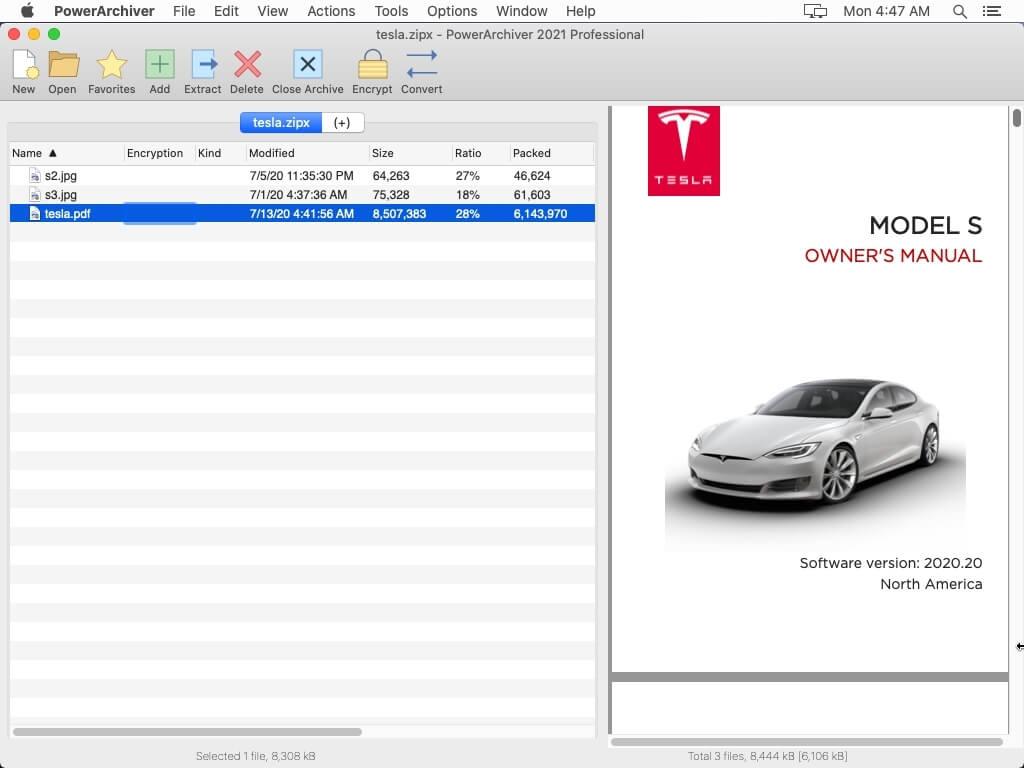
    Multi-tab workspace

    Open multiple archives in tabs within a single window — same Cmd+T pattern you already use in Safari, Finder, and Terminal. Switch between archives without launching multiple app instances.

    Drag-and-drop

    Drop a folder onto the dock icon or main window to create an archive. Drop files into an open archive to add them. Drag files out to extract. Native drag interactions, not bolted-on.

    Apple Silicon native

    Universal binary — runs natively on Apple Silicon (M1, M2, M3) and Intel Macs. Multi-core compression engine takes advantage of the performance cores; no Rosetta-2 translation overhead.

    Icon style customization

    Several built-in icon themes so the app matches your menu-bar / Finder aesthetic — light, dark, monochrome, and accent-color variants. macOS Big Sur, Monterey, Ventura, Sonoma, Sequoia all supported.

    30+ languages

    Same broad localization as the Windows edition. UI ships in 30+ languages — useful for shared Mac fleets in multi-language offices.

    Standalone tools

    Eight archive utilities included

    Beyond the main archive workspace, Pro for Mac bundles a suite of standalone utilities for batch operations, conversion, and archive maintenance. Accessible from the top bar or directly via dock.

    Archive Converter

    Convert one archive to a different format without re-compressing manually — e.g., RAR → ZIP for cross-platform sharing, or ZIP → 7Z for better compression.

    Encode Tool

    Encode files to MIME (Base64), UUencode, XXencode, or yEnc — useful for inline-email attachments and legacy upload workflows.

    Join Archive Tool

    Combine multi-part / spanned archives (.001 .002 .003 splits, .z01 .z02 splits) back into a single file before extraction.

    Multi-Volume Splitter

    Split large archives into fixed-size chunks for FAT32 / SD-card / email-attachment-size constraints. Reassembles cleanly with Join.

    Batch ZIP

    Zip a batch of folders or files into individual archives in one operation — useful for batch backups or distribution prep.

    Multi-Extract

    Extract a batch of archives in one pass — pick a folder of mixed-format archives, hit extract, walk away.

    Optimize Tool

    Re-pack existing ZIP archives with better compression settings to save storage without changing the archive format.

    Remove Encryption

    Strip encryption from an archive you have the password for — produces an unencrypted copy without the password-prompt overhead on subsequent uses.
    Pricing

    Same price as Pro for Windows · volume discounts at scale

    Single license at $34.95. Per-seat volume discounts kick in automatically at 2+ seats — useful for design studios, agencies, and Mac-fleet IT teams. Multilingual edition in EUR matches USD numeral.
    Quantity English-only USD Multilingual EUR Save
    1 $34.95 €34.95
    2–9 $25.00 €25.00 28%
    25–49 $17.00 €17.00 51%
    50–99 $13.00 €13.00 63%
    200–499 $7.50 €7.50 79%
    500–999 $5.00 €5.00 86%
    1000+ $4.00 €4.00 89%
    Buy English-only Buy Multilingual
    Mixed Windows / Mac fleets order both editions on one PO — pricing rolls up. For organizations standardizing on Mac, the same volume discounts apply. Talk to sales for fleet quotes above 500 seats.
    FAQ

    What Mac buyers ask

    Is the Mac edition the same product as Professional for Windows?

    Same archive engine, separate binary tuned for macOS. The Mac edition focuses on what Mac workflows actually need (Finder integration, multi-tab workspace, the 8-tool suite, broad format extraction). Some Windows-only features — Encryption Suite with OpenPGP signing, PowerArchiver Backup, Office add-ins, the full Secure FTP client, PACL command-line — are not in the Mac edition because the underlying macOS APIs / use cases differ. ZIP-AES-256 encryption is in both.

    Is it Apple Silicon native?

    Yes — universal binary. Runs natively on M1, M2, M3 series Apple Silicon (no Rosetta-2 translation), and natively on Intel Macs. The multi-core compression engine takes advantage of performance cores on Apple Silicon for noticeably faster compression on large archives versus translated x86 builds.

    What macOS versions are supported?

    macOS 10.15 Catalina and later — including Big Sur, Monterey, Ventura, Sonoma, and Sequoia. The icon themes adapt to the system appearance (light, dark, accent color). Older macOS versions (pre-Catalina) have a legacy build available — contact support if you need it.

    Does the encryption I create on Mac open in Windows / Linux / mobile?

    Yes — ZIP-AES-256 is the cross-platform standard (PKWare 5.2). Archives created in PowerArchiver Pro for Mac open in PowerArchiver for Windows, WinZip, 7-Zip (Linux), Keka (Mac), and most mobile ZIP utilities that support AES. The encryption is real and standards-based — not a Mac-specific format.

    Is there a 30-day trial?

    Yes — same 30-day full-feature trial as the Windows edition. Download, install, use every feature. Same install becomes your licensed copy when you decide to keep it — no separate license-conversion step.

    Can I license one key across my Mac and Windows machines?

    No — separate products, separate license keys. The Mac edition's $34.95 license activates only the Mac build; the Windows Professional $34.95 license activates only the Windows build. If you need both, buy both. (Pricing is parallel — $34.95 each — and volume discounts roll up across the fleet on the same PO.)

    Is there a Mac equivalent of PA Toolbox or PA Enterprise?

    Not currently — the Mac edition maps to Professional in the Windows lineup. Toolbox-only features (PACL command line, Virtual ISO Drive, full CD/DVD/Blu-ray Burner, Cloud Browser) and Enterprise-only features (FIPS 140-2 validated encryption, HIPAA / DFARS compliance, IT-control / audit logging, MSI / GPO deployment) are Windows-specific. Mac fleets with Enterprise compliance requirements typically run PowerArchiver on Windows infrastructure for the regulated workflow and Pro for Mac for endpoint Mac users.

    Volume licensing for Mac labs / design studios?

    Same per-seat volume discounts as the Windows tier (see table above). Common deployment patterns: 5–25 seats for design studios and small agencies, 50–200 seats for Mac-heavy creative departments at larger orgs, 500+ seats for organizations fully standardized on Mac. Request a volume quote for any size — typical turnaround is one business day.

    Is PA Mac Section 508 / accessibility compliant?

    Yes — same Section 508 compliance posture as the Windows edition. Request the VPAT (Voluntary Product Accessibility Template) for your accessibility-review team's procurement package.

    What about Linux?

    No native Linux GUI build. The Windows command-line suite (PACL) does NOT run on Linux either — Windows-only. Linux users typically combine native tools (7z, tar) with PowerArchiver Pro for Mac on the workstation if the team is mixed. See the PACL FAQ for the official answer on non-Windows command-line support.

    Ready for a real archive tool on your Mac?

    Free 30-day trial. Same install becomes your licensed copy when you decide. Perpetual license, never expires.