





After months of working on first super duper stable PA 2010 release, we think we finally got it. As 11.50 was first official release of our multicore optimized and brand new zip engine with huge number of new features (multicore, lzma, ppmd, unicode, bzip, wav, etc), we knew that 11.6x will be first true super release. It really does take million users to download and install PA in order to find some stranger issues that beta testers did not find
.
Of course, PA Team would not be PA Team if we stood still – as soon as 11.50 Final was released, we started working on 11.6 release. We knew that once you got hold of it, there will be some reports coming in. While waiting for those reports, we added few extra features, a lot of them requested by you:
- JPEG ZIPX support – we have worked on jpeg support since January 2009. It was not simple thing to do as specs were basically an PDF white paper, but Eugene gave it his best and here we are :-). More info in this blog post.
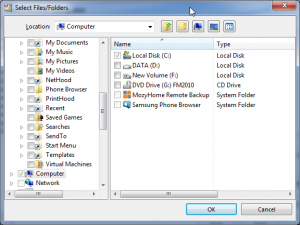
- Fenster “Dateien/Ordner auswählen” im Backup – you have requested checkbox based select files/folders window for quite a while now, and stars finally got aligned properly. It should be much nicer way to add files/folders to your backup script/pbs!
- SPTD layer for Burner – basically best way to access CD/DVD/BD burner, which assures that there are no access issues with multiple burner software being installed. You need to install latest PAVD drivers through Web update and this option will be automatically selected. More info here.
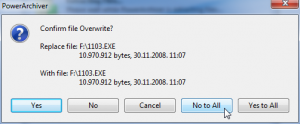
- No to All option – Yes, finally :-). All overwrite windows now have No to All option. Should be a lot easier now if you need that sort of option.
- Open archive after creation – new shell option, suggested by one of the forum dwellers.
- Fine tuned Win 7 experience – we managed to fix taskbar progress issue we had, and we fine tuned jumplists for Pro users, so Virtual Drive options would be shown regardless of how many most recently used items you have (expand your jumplist item number to 16 to see all PA jumplist options!). For those that dont know, we have been one of the first apps to add support for Win7 jumplists, taskbar overlays, etc. You can find out more in our blog post from February!
- Win98 support – Some people thought we only care about our coolest users – this is not true! What else can be said about Win98 we got back to PA 2010. It has not been easy, and it has caused a delay to 11.61 release but we recognize that some of our business customers simply have to use Win98 and we felt that we had to provide PA version with our brand new super duper zip/zipx engine for Win98 users as well. So here you go!
There are numerous other smaller improvements, as well as bug fixes that went into 11.61 release.
You can download 11.61 by clicking here.
Please let us know if you find any issues. Release will go up on all the official pages sometime tomorrow. We expect all translations to be done this week, including at least 2 new ones!
your PA Team.
