





Dear users,
PowerArchiver 2016 16.03.01 has been released today! It brings several fixes and improvements reported by users via forums, web chat and email support.
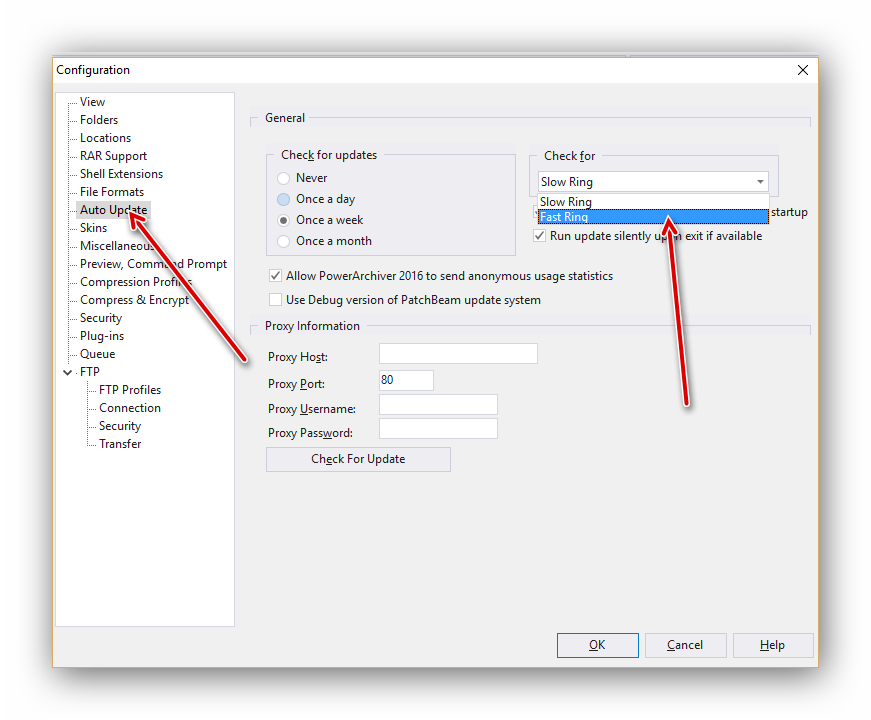
Fast Ring / Slow Ring update system reminder – We have introduced fast/slow ring update system since release of PA 2016. Please go to Config> Auto Update and select Fast Ring to get our “weekly” updates. For more info, visit our forums, each release is listed there and is based on your feedback via forums, web chat, and support. Contact us via any way you wish (email, chat, forums, support, phone) and let us know what want in next release! Please note: This update will be published as Fast Ring update and as latest official version on the download site. Slow ring users will get this update by the end of the month (Slow ring will be updated 1 time per month max, while Fast ring can get 2-4 updates per month).
Changes between 16.02.04 and 16.03.01
- FTP improvements – various small improvements in FTP functionality.
- Improved shell extensions – Improved shell extension behaviour when clicking on HDD or Start menu, depending on Windows OS.
- Advanced add Window fixes – Fixed issue with selecting files in Advanced Add window.
- Invalid filename extraction – Improved detection of invalid filenames under Windows, renaming them to proper filename during extraction.
- PAE2 renaming – Improved behaviour of Encrypt window when renaming PAE2 files.
- File selection in Modern/Ribbon ui – improved selection rectangle display when Modern GUI and color coded filelist are used.
- GUI look when Aero disabled – Improved look for background color of PowerArchiver various windows when AERO is disabled – same background color is used now.
- Fix for folder error – Specific issue with folder error displayed fixed.
You can download PA 2016 16.03.01 via Patchbeam (fast ring only) or via download site. Thank you for your continuous support since 1999, and making PowerArchiver better with your comments, requests and wishes!
